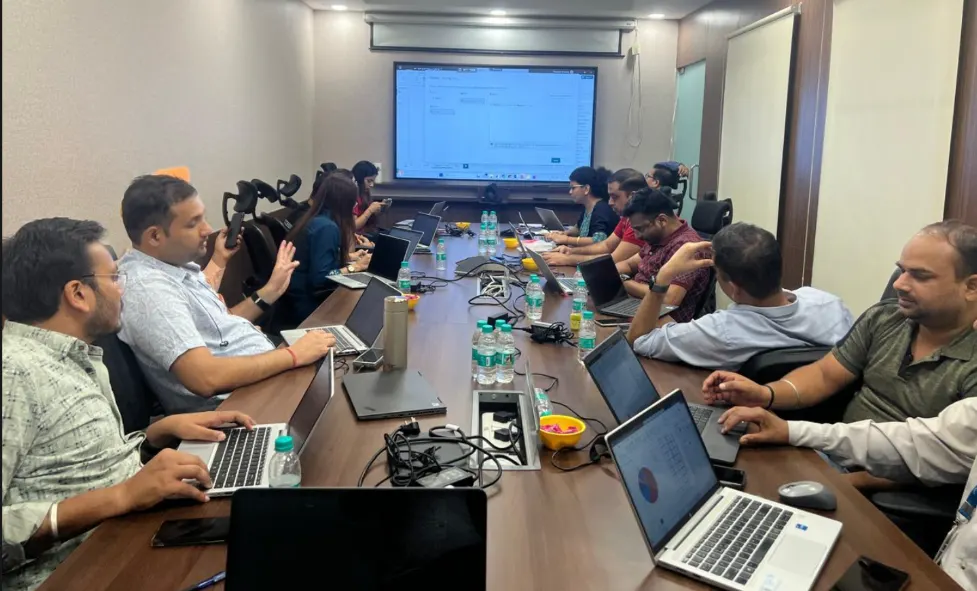
Advanced Excel Course Overview

Our Advanced Excel Course is one stop shop for all Advanced Excel Training it is organized into step-by-step lessons, you can do this with any excel version as long as you have the free power query add-in installed (which works in 2010, 2013, and 2016. Under the data driven industry of today, advanced Excel skills significantly increase employability and place individuals before the race for a job.

In this Advanced Excel Training, you’ll receive all of the following – and more: VLOOKUP, XLOOKUP, INDEX-MATCH, Pivot Tables, Power Pivot, Dashboards creation, Data Modeling, Financial Analysis, Conditional Formatting, Macro Programming and countless other professional techniques used across industries.

Whether you’re looking to advance your career, or you’re already an experience analyst who wants to learn more about Excel, our full array of interactive real-world projects will ensure that you are ready to face whatever job assignments come your way. You will learn how data is used, and even create complex graphs and charts that are made easy with excel.

You can finish the Advanced Excel Course in 2 months with our weekday batches, 3 months with our weekend batches or even fast track your journey by learning everything to become an ace in just 30 days through its advanced and intense fast-track program.

Ready to see what sets our Advanced Excel Training apart?

Why Choose Gyansetu’s Advanced Excel Course?

We at Gyansetu provide industry-leading Advanced Excel Training that goes beyond basic tutorials, offering comprehensive expertise, hands-on projects, and career-focused certification that transforms professionals into Excel masters.

  1. Comprehensive Curriculum: Our course includes all concepts that are used in industry.
  2. Industry-Expert Instructors: Learn from industry experts who have years of experience in industry.
  3. Hands-On Project: Work on real-world projects and gain practical knowledge.
  4. Flexible Learning: We offer flexible learning options to fit the schedule of every learner.
  5. Industry-Recognized Certification: Earn a certificate which is recognized 
  6. Placement Assistance: We offer 100% placement support in the form of resume optimization, job referrals and mock interviews.
  7. Live Interactive Training Sessions: Engage in our dynamic live classes with real-time doubt clearing, instructor interaction making complex topics easier.
  8. Lifetime Learning Resources Access: Get access to study materials, recorded sessions.
  9. Small Batch Sizes: We keep our batch size small to provide personalized attention.
  10. Post-Course Support: Our support lasts post-course providing networking opportunities.

advanced-excel-course

Key Highlights of Advanced Excel Course

100% Placement Support
Free Course Repeat Till You Get Job
Mock Interview Sessions
1:1 Doubt Clearing Sessions
Flexible Schedules
Real-time Industry Projects

Placement Stats

stats
Maximum salary hike
140%
Average salary hike
80%

Our Alumni in Top Companies

Advanced Excel Training Placement Highlights

Abhyudaya Singh
100 % Hike
B.Tech.
Fresher
MIS Executive
Airtel
Jayant Garg
100 % Hike
BCA
Fresher
MIS Executive
Equitas Small Finance Bank

Batches Timing for Advanced Excel Course

Track Weekdays (Tue-Fri) Weekends (Sat-Sun) Fast Track
Course Duration 2 Months 3 Months 30 Days
Hours Per Day 1-2 Hours 2-3 Hours 3-4 Hours
Training Mode Classroom/Online Classroom/Online Classroom/Online

Advanced Excel Certification Course

Our industry-recognized certification validates your comprehensive expertise and significantly enhances your professional credibility. Upon completing our Advanced Excel Course, you’ll receive a prestigious certificate that you can proudly share on LinkedIn, your resume, professional portfolio, and social media platforms—demonstrating your mastery to potential employers and clients.

  • Industry Recognition: Our certification is recognized by top employers of various industries.
  • Verified Authenticity: Each certificate contains a verifiable ID which can be used by employers to verify the skills of the learner.
  • Career Impact: Certified professionals report hikes in salary and better job opportunities.
advanced excel course certification

Advanced Excel Course Curriculum

Advanced Microsoft Excel training is a vibrant program being offered at Gyansetu, that trains learners to have all the required dynamic skills in roles that involve working with data in the present day world. Ranging all the way to advanced formulas and pivot tables up to VBA macros and power query, the curriculum will equip you with the real world data problems by presenting you with a hands-on project.

Workbook Protection & Security 7 Topics
  • Introduction to Excel
  • Password Protect a workbook/worksheet
  • Hiding & Unhiding Sheets
  • Protecting Workbook structure
  • Hiding sheets using VBA developer mode
  • Hiding Excel Functions
  • Locking/ Unlocking Cells
Data Types in Excel 8 Topics
  • Numbers
  • Text
  • Date Time
  • Currency
  • Percentage
  • Converting Numbers to Text
  • Converting Text to Numbers
  • Changing Date/Time formats
Scale up Speed using Short Keys 5 Topics
  • Working with Alt Key
  • Paste special
  • Insert Row/Column
  • Switch between worksheets
  • Navigate all excel features using Keyword
  • Top Bottom Rules
  • Highlight Cell Rules
  • Data Bars
  • Color Scales
  • Exploring Rules Manager
  • Use formulas for cell formatting
  • Text Filters
  • Number Filters
  • Sorting
  • Multi-level sorting
  • Text to Columns – Delimiters
  • Text to Columns – Fixed Width
  • Remove Duplicates
  • Data Validations
  • Grouping
  • Relative Referencing (A1)
  • Absolute Referencing ($A$1)
  • Partial Referencing ($A1) / (A$1)
  • Sum/ Sumif/ Sumifs
  • Count/ Countif/ Countifs
  • SumProduct
  • Round/ Roundup/ Rounddown
  • Min/ Max/ Average
  • If
  • And
  • Or
  • IsText
  • IsNumber
  • Vlookup
  • Vlookup with Match Function
  • Vlookup using (*) problems
  • Vlookup using Running Countif
  • Nested Vlookup
  • Hlookup
  • Index Match
  • Indirect
  • Offset
  • Char
  • Concatenate
  • Exact
  • Find/ Search
  • Left
  • Right
  • Proper
  • Mid
  • Upper
  • Weekday
  • Weeknum
  • Day/ Month/ Year
  • Date / Time
  • Hour/ Minute/ Second
  • Learning functions with {}
  • Eg. Minif, Maxif, etc.
  • Line
  • Column
  • Pie
  • Bar
  • Combo Charts
  • Waterfall Charts
  • Doughnut Charts
  • Dynamic Charts using Pivot Slicers
  • Pivot Table Fields
  • Filters/ Rows/ Columns/ Values
  • Insert Slicers
  • Insert Timelines
  • Group Selection
  • Changing Data Source
  • Report Layouts
  • Group Selection
  • Working with Multiple Tables using Relationship
  • Record a Macro
  • Save macro sheet in .xlsm format

Industry Ready Advanced Excel Projects

Practice real-life Excel projects like income tax reporting, customer data analysis, sales team performance, Salesforce data transformation, and audits within the education sector. These projects, which are designed by the industry experts, equip you with real business situations and thus ready you to be employed in analytics, finance, operations and reporting positions.
Designed by Industry Experts
Get Real-World Experience
Preparing Income Tax reports for Chartered Accounts

Preparing Income Tax Reports for Chartered Accountants by doing advanced calculations and analysis for tax filing processes.

Preparing Bank Customer Reports

Creating excel reports on bank customers, preparing strategies and enhancing customer relationship management for the institutions.

Performance Analysis of Sales team

Analyse sales performance by using data for insightful metrics, strategic decision-making and creating reports for the management.

Performing Excel operations to transform Salesforce Cloud Data and making it ready to import in the cloud.

Evaluating student data for Schools and Colleges and providing them a consolidated dashboard to improve their day to day operations.

clock-icon
64+
Hours of content
video
16+
Live sessions
hammer
5+
Tools and software

Advanced Excel Skills you can add in your CV

What Sets This Program Apart?

GyanSetu
Other Courses
all-in-one Complete Toolkit

✔ Advanced formulas & functions
✔ PivotTables & charts
✔ Power Query & Power Pivot
✔ Dashboard automation & macros

✘ Only basic Excel features
✘ Little/no advanced tools

progress-icon Beginner to Pro Roadmap

✔ Intermediate → advanced Excel workflows

✘ Lacks structured progression

empowered AI-Powered Learning

✔ AI tools for formula generation & problem solving

✘ No AI integration

focused Career Specialization

✔ Excel Analyst
✔ Reporting & BI Specialist

✘ General/basic spreadsheet training

exposure Real Industry Projects

✔ Business dashboards
✔ Automated reporting systems
✔ Data analysis projects

✘ Only demo examples

mentorship Industry Mentors

✔ Live guidance from experienced trainers

✘ Generic instructors

expertise Practical Learning

✔ Hands-on labs & real workplace scenarios

✘ Theory heavy

practice Career Support

✔ Resume building
✔ Mock interviews
✔ Placement assistance

✘ No structured job support

course in gurgaon
Who is this course for?
  • Data Analysts
  • Career Changers
  • Sales Professionals
  • Operations Manager
  • Financial Analysts
  • Business Professionals

Career Assistance for advanced microsoft Excel Training

briefcase
Job Opportunities Guaranteed

Get a 100% Guaranteed Interview Opportunities Post Completion of the training.

lock
Access to Job Application & Alumni Network

Get chance to connect with Hiring partners from top startups and product-based companies.

Mock Interview Session

Get One-On-One Mock Interview Session with our Experts. They will provide continuous feedback and improvement plan until you get a job in industry.

Live Interactive Sessions

Live interactive sessions with industry experts to gain knowledge on the skills expected by companies. Solve practice sheets on interview questions to help crack interviews.

lock
Career Oriented Sessions

Personalized career focused sessions to guide on current interview trends, personality development, soft skill and HR related questions.

briefcase
Resume & Naukri Profile Building

Get help in creating resume & Naukri Profile from our placement team and learn how to grab attention of HR’s for shortlisting your profile.

Top Companies Hiring for Advanced Excel Role

Honours & Awards Recognition

Awarded by GD Goenka University
GD Goenka University
Gyansetu conducted Power BI training for Livpure employees
Livpure
Gyansetu conducted Advanced Excel training for Denso International Employees
Denso International
Gyansetu conducted Full Stack Development training for ReverseLogix employees
ReverseLogix
Gyansetu conducted Advanced Java training for BML Munjal University students
BML Munjal University
Delivering training to Wedapt
Delivering Training To Wedapt
Gyansetu conducted workshop on Cloud Computing and Data Analytics for Manav Rachna University students
Manav Rachna University
Gyansetu conducted Java workshop for GLA University students
GLA University
Gyansetu conducted Data Analytics Workshop for DPGITM students
DPGITM
Certificate Issued to Gyansetu by GD Goenka University
GD Goenka University

FOR QUERIES, FEEDBACK OR ASSISTANCE

Contact Gyansetu Learner Support

Our Learners Testimonials

Varun Kapoor
I've found Gyansetu's learning environment to be incredibly conducive to skill development as an MIS executive at Hindustan Wellness. Through practical projects and real-world case studies, I gained invaluable hands-on experience
Satish Goyal
I began my journey at Gyansetu, where practical learning and real-world applications shaped my skills as an analytics specialist. The supportive environment empowered me to leverage data effectively for insights and innovation. Grateful to Gyansetu's for invaluable education which has played a pivotal role in my professional growth.
Azhar Ali
With the excellent curriculum, dedicated instructors, and practical exposure, Gyansetu has been instrumental in helping me land a job as a Business Intelligence Professional. Thank you for providing such a wonderful learning experience and helping me achieve my career goals.
self assessment
Self Assessment Test

Learn, Grow & Test your skill with Online Assessment Exam to achieve your Certification Goals.

FAQs: Advanced Excel Course

Q1: What will I learn in the Advanced Excel Course?

You will learn in-depth control of Excel such as advanced formulas, pivot tables, power query, VBA macro, data visualization, automation, financial modeling, dashboard creation, power pivot, conditional formatting, data analysis, business intelligence tools, and so on. The curriculum incorporates practical projects involving automated reporting and full-fleet solution analysis, which makes you well versed with the professional skills applied in every sector.

Q2: How long does it take to complete the Advanced Excel Course?

Our Advanced Excel Training offers flexible timing to meet your schedule. The training can be finished in 2 months with our weekday batches, 3 months with our weekend batches or can be rammed up in 30 days by our fast track program. Every batch has the same comprehensive curriculum with formulas and Macros, data analysis, visualization among others and hands-on projects and certification.

Q3: Do I need prior Excel experience to enroll?

We recommend basic to intermediate level of knowledge on Excel such as basic formulas and data entry, spreadsheet navigation. Our Advanced Excel Course is built on this base and enables the learning of more intricate functions, pivot tables, VBA programming, Power Query, automation, analytics and much more, making any intermediate user a true power user with applicable knowledge to the industry.

Advanced Excel Training extends well beyond simple spreadsheet functionality, with advanced features such as complex nested formulas, pivot tables, VBA macro programming, Data transformation with Power Query or data modeling with Power Pivot, advanced charting, dashboards, automation, financial modeling, statistics, and myriads of other business-level functionality.

Yes! On successful completion, you will achieve our industry-approved Advanced Excel Certification which certifies your proficiency in the formulas, macros, data analysis, data visualization and automation, among others. It is shareable on LinkedIn, your resume, portfolio, and social media, and proves that you are well-versed in Excel usage to your potential employers and clients around the globe.

With the advanced Excel Course certification, high paying positions in data analysis, financial modeling, business intelligence, MIS reporting, and the operations management among others become accessible. Experts in the field of working with pivot tables, VBA, creating dashboards, and automation receive larger salaries, faster promotions, and job security regardless of the field, such as finance, consulting, healthcare, and technology.

We have various learning options, which are flexible to various tastes. Select among online interactive sessions which also involve instructor interaction in real time, offline classroom training which also involves hands-on practice or a combination of both. The entire curriculum of formulas, macros, data analysis, visualization, automation, and many others is covered in all formats, which is a guarantee of the comprehensive development of skills.

Our Excel Training can work with Excel 2016, Excel 2019, Excel 2021 and Microsoft 365/Office 365. The key concepts such as formulas, pivot tables, Power Query, VBA macros, data analysis and visualization should be compatible with all of these versions but we suggest Microsoft 365 to have access to the newest features and updates.

Absolutely! Our services involve full placement services such as resume construction, interview training which emphasizes the application of Excel situations, job referrals to our hiring partners in various industries, LinkedIn profile development, and career coaching. Advanced Excel Certification has enabled our graduates to work in analytics, finance, consulting, operations and more to grow their careers.

You will do several practical projects, such as financial dashboards with dynamically-rendered charts, automated monthly reporting systems, sales analytics in pivot tables, inventory management solutions, budget forecasting models, data cleaning in Power Query, interactive business intelligence dashboards, VBA-based automation tools, and many others – building a portfolio that represents all your comprehensive knowledge.

High-level Excel is needed in any industry: financial professionals rely on it to model finances and make predictions; HR departments use it to analyze their workforce and conduct reports: pivot tables are used to examine campaign data and create reports; operations managers develop dashboards to track their performance; consultants create data analysis models, and that is just a handful of examples to demonstrate that Excel expertise is universally valuable.

Yes! Our well-rounded curriculum consists of a good VBA training on macro recording and editing, and custom programming to automate tasks, user form creation, custom functions development, interactive applications, repetitive workflow automation, etc. You will acquire real-world skills in creating effective VBA applications that will make your time in different applications of Excel more productive.

Pivot tables are also strong Excel tools of summarizing, analyzing and presenting extensive data dynamically. Our Advanced Excel Course will enable you to work with complex pivot tables, and calculated fields, filters and slicers, pivot charts, work with Power Pivot and big data, create interactive dashboards, and much more a skill set that a professional in data analysis need not be without.

Yes! Our learning resources such as in-depth course material, practice workbooks, formula reference guides, VBA code libraries, project templates, video recordings of classes, advanced Excel shortcuts, real-life datasets to practice with, and any other learning material necessary to learn and develop all the required skills after the course are complete.

Power Query is a highly powerful data transformation tool that is no longer limited to the traditional formulas, since it allows you to import various types of data, process large volumes of data faster and more effectively, automate data preparation processes, combine several tables, execute complex data processing and much more, so it is a key element of modern data analysis and business intelligence solutions.

frequently asked questions by students for courses
Drop us a Query
+91-9999201478

Available 24x7 for your queries

Please enable JavaScript in your browser to complete this form.
Categories